
🟩 Launch child processes, redirect their standard streams, and build pipelines
SaneCppProcess.h provides a cross-platform process-launching layer for code that cannot use the STL or exceptions and does not want Process itself to perform hidden allocations.
Dependencies
When to use Process
Use Process when a program needs to start a known executable and control its working directory, environment, standard input, standard output, or standard error on Windows, macOS, and Linux. It covers two common shapes:
- one child, represented by SC::Process; and
- a shell-like pipeline, represented by SC::ProcessChain and a caller-owned SC::Process for every stage.
The API deliberately accepts an argument span rather than a command-line string. Process performs the platform-specific encoding and quoting needed by the native launcher; it does not invoke a shell or interpret shell syntax. If expansion, redirection syntax, globbing, or shell built-ins are required, launch the chosen shell explicitly and accept that shell's quoting and security model.
Process is synchronous at its core. SC::Process::exec launches and waits, while launch separates creation from the final SC::Process::waitForExitSync call. That separation exposes the native process handle and pipe endpoints, but it does not turn stream capture into event-loop I/O. Use Async to monitor the handle without blocking, or Await for coroutine composition; AwaitProcessExitCodes is a complete example of waiting for two launched children concurrently.
One object is one child launch
POSIX executable launches restore default signal dispositions and clear the child thread's inherited signal mask before exec. This also applies to ignored signals, whose ignored disposition would otherwise survive exec. The parent's dispositions and mask are unchanged. Fil-C leaves runtime-reserved signals untouched, using its runtime signal-support predicate rather than a fixed signal list; supported signals and mask clearing still follow the normal launch policy. ProcessFork is a snapshot primitive and does not perform this executable-launch reset.
SC::Process stores the native process handle, exit status, launch options, formatted arguments, environment overrides, and any descriptors used for redirection. Configure it, call exec for the simple blocking case, or call launch and later waitForExitSync when work must happen between those operations. SC::Result reports launch, pipe, and wait errors; after a successful wait, SC::Process::getExitStatus returns the child's own status code.
When an AsyncProcessExit request observes a launched child, its successful callback performs the POSIX wait and reap. Do not call waitForExitSync afterward. If the async request fails to start or is stopped before completion, the caller must still wait for the child. The process exit code from an async wait comes from the callback result; Process::getExitStatus is updated only by Process::waitForExitSync.
This compiled example shows the basic launch, application-work, and waitForExitSync lifecycle:
    // Example: launch a child process and explicitly wait for it to finish execution
    Process process(commandArena.toSpan(), environmentArena.toSpan());
    SC_TRY(process.launch({"ls", "-l"}));
    // ...
    // Here you can do I/O to and from the spawned process
    // ...
    SC_TRY(process.waitForExitSync());
    // This is equivalent to process.exec({"ls", "-l"})
Standard streams are policies supplied at the call site:
- the default inherits the parent's stream;
- SC::Process::StdOut::Ignore sends output to the null device;
- a
String,SmallString,Buffer, or writable span captures output; - a string or readable span supplies standard input; and
- a SC::FileDescriptor or SC::PipeDescriptor transfers an existing endpoint into the launch.
This tested example builds a two-stage pipeline and captures the final standard output:
    // Executes two processes piping output of process p1 to input of process p2.
    // Then reads the output of the last process in the chain and check its correctness.
    ProcessChain chain;
    Process      p1, p2;
    // Print "Salve\nDoctori" on Windows and Posix and then grep for "Doc"
    StringView expectedOutput;
    switch (HostPlatform)
    {
    case Platform::Windows: {
        expectedOutput = "Doctori\r\n";
        SC_TEST_EXPECT(chain.pipe(p1, {"cmd", "/C", "echo", "Salve", "&", "echo", "Doctori"}));
        SC_TEST_EXPECT(chain.pipe(p2, {"findstr", "Doc"}));
    }
    break;
    default: { // Posix
        expectedOutput = "Doctori\n";
        SC_TEST_EXPECT(chain.pipe(p1, {"echo", "Salve\nDoctori"}));
        SC_TEST_EXPECT(chain.pipe(p2, {"grep", "Doc"}));
    }
    break;
    }
    String output;
    SC_TEST_EXPECT(chain.exec(output));
    SC_TEST_EXPECT(output == expectedOutput);
Capturing into a growable buffer is convenient for bounded command output, but launch drains that output synchronously before returning. A writable span avoids growth; reading stops when the span is full and the capture pipe is then closed, so it is not a safe way to truncate a child that must successfully write more output. For streaming, large, or asynchronously consumed output, pass an external pipe and drain it through File or Async. As with all pipes, every unused writer must close before a reader can observe EOF.
Storage and hard limits
The library does not allocate argument or environment storage. Each SC::Process contains inline native-character arenas: SC::Process::InlineCommandStorageCapacity for the formatted command and 4096 * 8 elements for environment overrides. Callers with different limits can pass both arenas to the constructor. Those spans must remain valid for the lifetime of the Process object.
The storage is bounded as well as caller-controlled. POSIX launches accept at most 64 arguments, and the combined child environment table accepts at most 256 entries. Formatting, setting an environment variable, or launching returns an error when the relevant arena or table cannot hold the request. Output capture has the allocation policy of the supplied destination: SmallString<N> can remain inline, a fixed span never grows, and a dynamic String may allocate through its configured allocator.
SC::Process is intentionally a substantial object because its default arenas live inside it. Put it where that footprint is appropriate, or supply external storage when an application already owns suitable memory.
Pipelines are intrusive and caller-owned
SC::ProcessChain models the useful subset of a shell pipeline without introducing a shell. Each call to SC::ProcessChain::pipe formats one stage and connects it to the previous stage with an anonymous pipe. launch starts all stages; exec additionally waits for all of them.
The chain does not allocate nodes or own Process objects. It links the supplied objects intrusively, so every Process must be unlaunched, can belong to only one chain, and must remain alive and at a stable address until SC::ProcessChain::waitForExitSync clears the links. The chain redirects standard output between stages; it is not a shell job-control system and does not parse command text, create arbitrary descriptor graphs, or expose per-stage policies for redirecting standard error.
Waiting succeeds when the operating-system waits succeed; inspect each Process with getExitStatus() if application success depends on individual stage exit codes. This differs from shell policies such as pipefail, which ProcessChain does not emulate.
Environment and working directory
SC::Process::setEnvironment adds or replaces a variable for the child. Parent variables are inherited by default; SC::Process::inheritParentEnvironmentVariables(false) starts from an empty environment before applying overrides. SC::Process::setWorkingDirectory selects the child's initial directory without changing the parent's directory.
SC::ProcessEnvironment serves a different purpose: it is a non-copyable, read-only view used to enumerate or query the current process environment. Returned SC::StringSpan values borrow native environment storage and should not be treated as owned strings. This tested example adds a child variable and confirms that normal parent inheritance remains enabled:
    Process process(commandArena.toSpan(), environmentArena.toSpan());
    // This child process will inherit parent environment variables plus NewEnvVar
    SC_TEST_EXPECT(process.setEnvironment("NewEnvVar", "SomeValue"));
    String output;
    // Spawn the child process writing all env variables as KEY=VALUE\n to stdout, redirected to output
    SC_TEST_EXPECT(spawnChildAndPrintEnvironmentVars(process, output));
    // We can check that the NewEnvVar has been set to SomeValue
    StringView out = output.view();
    SC_TEST_EXPECT(out.containsString("NewEnvVar=SomeValue"));
    // PATH env var exists because we are inheriting environment
    SC_TEST_EXPECT(out.containsString("PATH="));
The SC::Process API documentation also includes source-backed examples for replacing an inherited variable and launching without the parent environment.
Fork is a specialized snapshot primitive
SC::ProcessFork is separate from launching an executable. It clones the current process, exposes parent and child sides, and provides a pair of pipes for coordination. Its main intended use is taking a copy-on-write snapshot of a large live data structure so the child can serialize it while the parent continues. The implementation uses native fork behavior on POSIX and native process-cloning facilities on Windows.
This is not a general portability promise for arbitrary post-fork C++ code. Other threads do not continue normally in the child; locks held by vanished threads can deadlock; GUI and graphics APIs are unsafe choices; and handles needed by the child must have appropriate inheritance. Windows ARM64/x64 emulation is explicitly unsupported for this operation. Keep the child path small and restricted to well-understood console, file, socket, and pipe operations. Applications that do not need memory-snapshot semantics should launch a separate executable instead: it has a much clearer initialization and lifetime boundary.
The full source-backed fork example is available in the SC::ProcessFork API documentation.
Boundaries and neighboring libraries
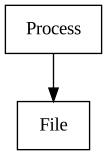
File is the sole library dependency and owns the descriptor and pipe abstractions used for redirection. Process decides how those endpoints attach to a child; File performs synchronous byte I/O on them.
Async can wait for a launched native process handle and can drive compatible pipe descriptors on an event loop without taking a dependency on Process. Await adds coroutine-oriented process waiting. SC::Plugin and the repository tools use Process when they need real child executables rather than in-process callbacks.
Process is a fit for explicit executable launches, bounded synchronous capture, and small portable pipelines. It is not a terminal emulator, shell parser, daemon supervisor, sandbox, privilege-management layer, or full job-control API. It also does not provide timeouts, forced termination, or automatic concurrent draining of several captured streams; those policies belong in the application or in an Async/Await composition.
For the complete API surface and option fields, see the Process module.
Status
🟩 Usable
The library is used by Plugin, repository tools, and the Await process-exit example.
Videos
Blog
- March 2024 Update
- April 2024 Update
- April 2025 Update
- July 2025 Update
- August 2025 Update
- September 2026 Update
Roadmap
💡 Unplanned Features:
- None
Statistics
LOC counts exclude comments. Library counts files physically under Libraries/Process. Single File counts SaneCppProcess.h. Standalone counts SaneCppProcessStandalone.h and intentionally includes dependency payloads.
| Metric | Header | Source | Sum |
|---|---|---|---|
| Library | 585 | 1196 | 1781 |
| Single File | 1706 | 1982 | 3688 |
| Standalone | 3353 | 4218 | 7571 |