🟨 Cross-platform completion-based asynchronous I/O
SaneCppAsync.h is a completion-based event loop for files, sockets, timers, processes, filesystem operations, background work, and signals. Its request bookkeeping and payload storage are caller-owned; creating the loop and starting operations can still create operating-system resources such as queues, descriptors, and threads.
Dependencies
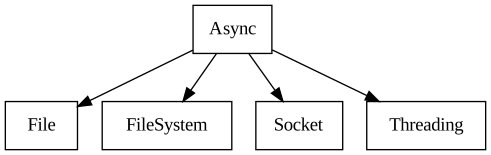
- Dependencies: File, FileSystem, Socket, Threading
- All dependencies: File, FileSystem, Socket, Threading
What Async Is For
Synchronous I/O can leave a thread waiting for a file, socket, timer, or child process. Async lets one thread submit many such operations and dispatch their completions from a single AsyncEventLoop. It presents the same completion-based model over IOCP on Windows, kqueue on macOS, and io_uring or epoll on Linux.
Use Async when you need:
- one cross-platform loop for sockets, files, timers, signals, processes, filesystem operations, and background work;
- explicit control over when requests are submitted, the operating system is polled, and callbacks are dispatched;
- integration with another loop, such as an immediate-mode GUI or an application-owned main loop;
- bounded, caller-owned request and buffer storage with no allocation inside the library;
- callbacks rather than a coroutine or fiber runtime.
For sequential stream processing, see AsyncStreams. For C++20 co_await syntax over a subset of these operations, see Await. For stackful tasks that suspend on this event loop, see AsyncFibers.
Mental Model: Requests Live Until Completion
Every operation is an object derived from AsyncRequest: for example AsyncSocketReceive, AsyncFileRead, or AsyncLoopTimeout. The caller fills the request, installs its callback, and starts it on an AsyncEventLoop. The loop submits it to the platform backend and later invokes the callback while dispatching completions.
The request object and all memory referenced by it must stay at stable addresses until its callback runs. The event loop links requests through intrusive fields in AsyncRequest; it does not copy them or allocate replacement state. Buffers must remain valid for the same period.
Once start() succeeds, completion—including an operating-system error—is reported through the callback. A request whose start fails was not accepted. Explicitly stopping a request suppresses its normal callback. Until the optional stop callback runs, the request is still owned by the loop and its storage cannot be reused; without that callback, the caller must otherwise drive teardown to completion before destroying it.
A completion callback may call result.reactivateRequest(true) to submit the same request again. This is useful for a repeating timer, a receive loop, or another long-lived operation, but it also extends the request and buffer lifetime to the next completion.
Process Exit
AsyncProcessExit waits for one child process. On macOS and Linux, a successful exit callback has already reaped the child, so do not call Process::waitForExitSync afterward. A failed start or a request stopped before its exit callback leaves waiting and reaping with the caller. Register only one exit request for each child; two waiters can race to consume the same exit status. On Windows, the callback reads the process exit code from the native handle; the caller still owns that handle through its Process object.
For a process with redirected output, keep its storage alive until the exit callback and both output streams have finished. A canceled exit request does not terminate or reap the child.
Driving The Event Loop
The smallest complete shape is: create a loop, create caller-owned requests, start them, and run until no work remains. This example is compiled as part of AsyncTest:
AsyncEventLoop eventLoop;
SC_TRY(eventLoop.create()); // Create OS specific queue handles
// ...
// Add all needed AsyncRequest
// ...
SC_TRY(eventLoop.run());
// ...
// Here all AsyncRequest have either finished or have been stopped
// ...
SC_TRY(eventLoop.close()); // Free OS specific queue handles
There are three convenience run modes:
run()blocks and dispatches until every request has completed or been stopped.runOnce()blocks until at least one request makes progress, then dispatches ready completions.runNoWait()submits and dispatches currently available work without waiting.
Applications that already own their main loop can separate the three phases with submitRequests(), blockingPoll(), and dispatchCompletions(). AsyncEventLoopMonitor goes further: one thread can monitor the OS backend while another thread stops monitoring and dispatches completions. This separation is the important integration seam—callbacks still run on the thread that dispatches them, not on an arbitrary kernel thread.
run() normally returns after counted work drains, but interrupt() can make it return early and excludeFromActiveCount() can keep a long-lived request from holding it open. Neither facility releases an active request: it must still complete, be stopped, or be released when the loop closes. Interruption does not discard a collected native completion batch: dispatch finishes that batch before run returns. A pending interruption returns from run before another poll and is consumed even when no counted work remains. Closing drains cancellation regardless of application interruption.
Timers And Cross-Thread Wake-Ups
AsyncLoopTimeout schedules an absolute or relative timeout. Its callback can alter the request and reactivate it, turning the same stable object into a repeating timer:
// Create a timeout that will be called after 200 milliseconds
// AsyncLoopTimeout must be valid until callback is called
AsyncLoopTimeout timeout;
timeout.callback = [&](AsyncLoopTimeout::Result& res)
{
    console.print("My timeout has been called!");
    if (someCondition) // Optionally re-activate the timeout if needed
    {
        // Schedule the timeout callback to fire again 100 ms from now
        res.getAsync().relativeTimeout = Time::Milliseconds(100);
        res.reactivateRequest(true);
    }
};
// Start the timeout, that will be called 200 ms from now
SC_TRY(timeout.start(eventLoop, 200_ms));
An unsequenced timeout can be removed synchronously with AsyncLoopTimeout::unschedule. Success suppresses its callback and leaves the request free without dispatching other event-loop callbacks. The caller must serialize this operation with event-loop submission, polling, and callback dispatch. Use the ordinary asynchronous stop operation for sequenced timeouts and other request types.
AsyncLoopWakeUp is the explicit bridge from another thread into the event loop. Waking a request through the event loop is thread-safe; the callback is delivered by the thread dispatching the event loop:
// Assuming an already created (and running) AsyncEventLoop named eventLoop
// ...
// This code runs on some different thread from the one calling SC::AsyncEventLoop::run.
// The callback is invoked from the thread calling SC::AsyncEventLoop::run
AsyncLoopWakeUp wakeUp; // Memory lifetime must be valid until callback is called
wakeUp.callback = [&](AsyncLoopWakeUp::Result& result)
{
    console.print("My wakeUp has been called!");
    result.reactivateRequest(true); // To allow waking-up again later
};
SC_TRY(wakeUp.start(eventLoop));
Use AsyncLoopWork for work submitted to a caller-provided ThreadPool, and AsyncExternalCompletion when an external API already has its own asynchronous completion mechanism that needs to re-enter the loop.
Socket I/O
The loop can create asynchronous IP and Unix-domain sockets and operate on SocketDescriptor values from the Socket library. Accept/connect and stream send/receive are separate request types; unconnected datagrams use send-to/receive-from requests that carry a family-neutral SC::SocketAddress. Existing SC::SocketIPAddress overloads remain available for IP callers. Unix pathname streams and datagrams work on macOS and Linux, with Linux abstract names supplied by Socket; Windows and Emscripten report Unix-domain creation as unsupported.
AsyncSocketReceiveFrom consumes one datagram per completion. A zero-byte datagram succeeds and does not set disconnected. When the destination is too short, the result reports the copied prefix and isTruncated() is true; completionData.truncated carries the same information. UDP excess bytes are discarded, so the next receive starts at the next datagram. The original message length is not reported. A zero-capacity buffer can consume a nonempty datagram and return an empty truncated prefix. This contract applies to native readiness, io_uring and Windows overlapped UDP; other receive errors retain their normal Result identity. Check truncation before interpreting a complete-message format.
A receive request owns no payload memory: the destination buffer in this compiled example remains in scope until the callback finishes. The callback may reactivate the request after consuming data to continue the receive loop.
// Assuming an already created (and running) AsyncEventLoop named `eventLoop`
// and an unconnected socket named `client`
// ...
char receivedData[100] = {0}; // A buffer to hold data read from the socket
AsyncSocketReceive receiveAsync;
receiveAsync.callback = [&](AsyncSocketReceive::Result& res)
{
    Span<char> readData;
    if(res.get(readData))
    {
        if(res.completionData.disconnected)
        {
            // Last callback invocation is done when the other side of the socket
            // has disconnected:
            // - completionData.disconnected is == true
            // - readData.sizeInBytes() is == 0
            console.print("Client disconnected");
        }
        else
        {
            // readData is a slice of receivedData with the received bytes
            console.print("{} bytes have been read", readData.sizeInBytes());

            // IMPORTANT: Reactivate the request to receive more data
            res.reactivateRequest(true);
        }
    }
    else
    {
        // Some error occurred, check res.returnCode
    }
};
SC_TRY(receiveAsync.start(eventLoop, client, {receivedData, sizeof(receivedData)}));
Send and receive operations may complete with fewer bytes than requested. Applications must advance through their data or use AsyncStreams when they want higher-level streaming and buffering behavior.
File I/O And Blocking Backends
Files expose a portability distinction that the API keeps visible. Some backends can perform a file operation natively; others require blocking work. For operations that may block, the caller supplies a ThreadPool and associates the request with an AsyncTaskSequence through executeOn().
AsyncThreadPoolMode::NativePreferred uses native support when available and the supplied pool where necessary. AsyncThreadPoolMode::ForceThreadPool forces the pool even on a native-capable backend. The pool, its storage, the file descriptor, request object, and buffers all remain caller-owned.
This source-backed example opens a regular file, reads it in chunks, and uses a task sequence where the backend needs blocking work:
// Assuming an already created (and running) AsyncEventLoop named `eventLoop`
// ...

// Assuming an already created threadPool named `threadPool`
// ...

// Open the file
FileDescriptor fd;
FileOpen openMode;
openMode.mode = FileOpen::Read;
openMode.blocking = true; // AsyncFileRead::Task enables using regular blocking file descriptors
SC_TRY(fd.open("MyFile.txt", openMode));

// Create the async file read request and async task
AsyncFileRead asyncReadFile;
asyncReadFile.callback = [&](AsyncFileRead::Result& res)
{
    Span<char> readData;
    if(res.get(readData))
    {
        if(res.completionData.endOfFile)
        {
            // Last callback invocation done when end of file has been reached
            // - completionData.endOfFile is == true
            // - readData.sizeInBytes() is == 0
            console.print("End of file reached");
        }
        else
        {
            // readData is a slice of receivedData with the received bytes
            console.print("Read {} bytes from file", readData.sizeInBytes());

            // OPTIONAL: Update file offset to receive a different range of bytes
            res.getAsync().setOffset(res.getAsync().getOffset()  + readData.sizeInBytes());

            // IMPORTANT: Reactivate the request to receive more data
            res.reactivateRequest(true);
        }
    }
    else
    {
        // Some error occurred, check res.returnCode
    }
};
char buffer[100] = {0};
asyncReadFile.buffer = {buffer, sizeof(buffer)};
// Obtain file descriptor handle and associate it with event loop
SC_TRY(fd.get(asyncReadFile.handle, Result(false)));

// Start the operation on a thread pool
AsyncTaskSequence asyncFileTask;
SC_TRY(asyncReadFile.executeOn(asyncFileTask, threadPool));
SC_TRY(asyncReadFile.start(eventLoop));

// Alternatively if the file is opened with blocking == false, AsyncFileRead can be omitted
// but the operation will not be fully async on regular (buffered) files, except on io_uring.
//
// SC_TRY(asyncReadFile.start(eventLoop));
When using explicit file offsets, prefer one contiguous buffer for portable code. Scatter/gather writes combined with an offset need backend-specific validation before being treated as a portable idiom.
AsyncFileReadiness is different from file read/write: it waits for readiness on descriptors where the operating system provides that concept. POSIX file readiness is exposed directly. Windows does not provide a portable equivalent for ordinary file or pipe handles, and higher layers should not pretend otherwise.
The file request types also operate on compatible descriptor handles from neighboring libraries. That includes serial ports from SerialPort and PipeDescriptor endpoints accepted or connected through NamedPipeServer and NamedPipeClient; their framing, connection, and platform rules still come from those APIs rather than from Async.
Sequencing And Long-Lived Operations
AsyncSequence serializes requests by submitting the next request after the current one completes. It is useful when operations share a descriptor or must preserve ordering. AsyncTaskSequence combines that ordering with a supplied thread pool for potentially blocking work.
Long-lived sources such as FileSystemWatcher naturally remain callback streams. Their request and any bounded event storage must remain owned by the application until the watcher is stopped. This is also why Await does not expose a watcher as a single awaitable operation.
The library also provides requests for child-process exit, signals, filesystem operations, and external completions. See the Async API group for the complete reference after choosing the relevant operation family.
Platform Backends And Tradeoffs
The common request model maps to different operating-system facilities:
| Platform | Backend | Important consequence |
|---|---|---|
| Windows | IOCP / OVERLAPPED | Completion-based socket and file I/O; some handle readiness concepts do not map portably. |
| macOS | kqueue | Readiness and event notifications; blocking file work uses a supplied thread pool. |
| Linux | direct io_uring, falling back to epoll | No liburing dependency; native file I/O is preferred when io_uring is available. |
The Linux backend first attempts direct io_uring setup and falls back to epoll when the kernel or runtime policy does not permit it. Applications should depend on the Async semantics rather than assuming which backend was selected.
Caller-owned request and payload storage gives predictable ownership and makes bounded pools possible, but it is not automatic lifetime management. A request accidentally moved, destroyed, or paired with a temporary buffer while active is a programming error. ArenaMap from Containers can provide a preallocated bounded pool of stable request objects when an application needs many operations.
Status
🟨 MVP This is usable but needs some more testing and a few more features.
Videos
These videos record the implementation and integration work behind the library:
- Ep.07 - SC::Async Linux epoll 1/2
- Ep.08 - SC::Async Linux epoll 2/2
- Ep.10 - A Tour of SC::Async
- Ep.11 - Linux Async I/O using io_uring (1 of 2)
- Ep.12 - Linux Async I/O using io_uring (2 of 2)
- Ep.14 - Async file read and writes using Thread Pool
- Ep.16 - Implement SC::AsyncLoopWork
- Ep.18 - BREAK SC::Async IO Event Loop
- Ep.20 - Pause Immediate Mode UI - Save CPU Time
- Ep.21 - Add Async IO to Immediate Mode GUI
Blog
Development notes and design changes are recorded in the project updates:
- April 2024 Update
- May 2024 Update
- June 2024 Update
- July 2024 Update
- August 2024 Update
- December 2024 Update
- January 2025 Update
- April 2025 Update
- May 2025 Update
- June 2025 Update
- July 2025 Update
- August 2025 Update
- November 2025 Update
- December 2025 Update
- January 2026 Update
- February 2026 Update
- March 2026 Update
- May 2026 Update
- June 2026 Update
- September 2026 Update
Roadmap
🟩 Usable Features:
- More AsyncFileSystemOperations
- Async DNS Resolution
🟦 Complete Features:
- TTY with ANSI Escape Codes
- Signal handling (multi-watcher, cross-platform)
Statistics
LOC counts exclude comments. Library counts files physically under Libraries/Async. Single File counts SaneCppAsync.h. Standalone counts SaneCppAsyncStandalone.h and intentionally includes dependency payloads.
| Metric | Header | Source | Sum |
|---|---|---|---|
| Library | 2121 | 6094 | 8215 |
| Single File | 2100 | 7228 | 9328 |
| Standalone | 8432 | 14790 | 23222 |