
Sane C++ Libraries
C++ Platform Abstraction Libraries
Loading...
Searching...
No Matches
Http

🟥 Allocation-free HTTP/1.1 client, server, parser, and WebSocket building blocks

Http is the low-level HTTP/1.1 stack for applications already built around SC's asynchronous event loop and streams. It provides an incremental parser, an asynchronous client and server, static-file serving, routing and header helpers, multipart processing, and WebSocket handshake and framing support. The implementation does not allocate: connection capacity, stream queues, header space, and body buffering are chosen and owned by the caller.

That control is the main reason to choose this library. It is a good fit when memory bounds and transport integration matter more than a high-level, batteries-included HTTP API. It is not currently a general replacement for a mature internet-facing HTTP stack: applications must supply policy such as redirects, authentication, retries, request limits, and security hardening, and some valid protocol features are deliberately rejected rather than partially handled.

SaneCppHttp.h packages the library as a single-file distribution.
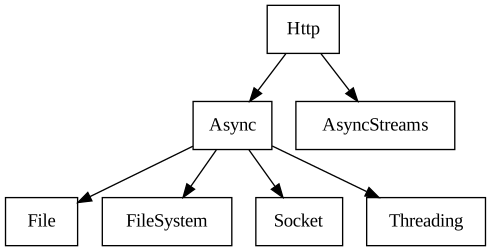
Dependencies

Dependency Graph

The model: messages moving through fixed storage

The parser consumes whatever bytes are currently available and reports tokens as soon as they are complete. Headers do not require the entire message body to be resident, and bodies remain streams. This is the same model at every level:

  • HttpRequest and HttpAsyncClientResponse are incoming messages. They expose parsed headers and an AsyncReadableStream for the body.
  • HttpResponse and HttpAsyncClientRequest are outgoing messages. They build headers in fixed storage and expose an AsyncWritableStream for the body.
  • HttpConnectionBase holds the active streams and buffer pool. Server-side HttpConnection adds the request/response pair; HttpAsyncClient owns the inverse request/response pair over caller-provided connection storage.

This symmetry makes streaming explicit. Receiving response headers is not request completion: attach body listeners to HttpAsyncClientResponse::getReadableStream() and treat its eventEnd as completion. Likewise, a server callback may start a response while the request body is still arriving; it must consume, pipe, or deliberately reject that body.

The incremental design has a cost. Parsed URL and header views exposed by an active connection point into its header storage. They are meaningful only for the current message and must not be retained after the connection is reused. Spans passed to asynchronous writes must also remain alive until the write completes. Where stack-owned response text cannot meet that lifetime, use the HttpConnection::sendBodyCopy, sendTextCopy, or sendJsonCopy helpers; these copy into the connection's fixed buffer pool and can fail when that pool is full.

Choosing memory limits

HttpAsyncConnection<ReadQueue, WriteQueue, HeaderBytes, StreamBytes> and HttpAsyncClientConnection<ReadQueue, WriteQueue, HeaderBytes, StreamBytes> make the common configuration a type-level choice. On the server, the span passed to HttpAsyncServer::init() fixes maximum concurrent connections. Each element contains its own read queue, write queue, stream storage, and shared request/response header space.

These limits are behavior, not tuning hints:

  • a request or response whose headers exceed available header storage fails;
  • a burst that cannot fit the fixed async queues applies backpressure or reports an error;
  • full-message assembly, decompression output, multipart field collection, and WebSocket message assembly need explicit caller storage when requested;
  • increasing concurrent connection count multiplies the per-connection storage chosen by the application.

The library reports these conditions through Result; it does not silently truncate and does not throw. Error messages usually name the layer enforcing the invariant (HttpIncomingMessage, HttpAsyncClient, HttpWebSocketFrameReader, and so on), which is more useful here than a large exception hierarchy.

Representative server

The server owns no connection allocation. This tested example fixes capacity at three connections and sizes each connection's queues and storage at compile time. The callback reads the parsed request and writes the response through that connection; shutdown must finish before the connection array is reclaimed. The example deliberately uses an application-owned String for its response body to exercise asynchronous span lifetime. That allocation is in the test application, not the server; a bounded application can instead write caller-owned fixed storage or use the connection's fixed-pool copy helpers.

constexpr int MAX_CONNECTIONS = 3; // Max number of concurrent http connections
constexpr int REQUEST_SLICES = 2; // Number of slices of the request buffer for each connection
constexpr int REQUEST_SIZE = 1 * 1024; // How many bytes are allocated to stream data for each connection
constexpr int HEADER_SIZE = 8 * 1024; // How many bytes are dedicated to hold request and response headers
// The size of the header and request memory, and length of read/write queues are fixed here, but user can
// set any arbitrary size for such queues doing the same being done in HttpAsyncConnection constructor.
using HttpConnectionType = HttpAsyncConnection<REQUEST_SLICES, REQUEST_SLICES, HEADER_SIZE, REQUEST_SIZE>;
// 1. Memory to hold all http connections (single array for simplicity).
// WebServerExample (SCExample) shows how to leverage virtual memory, to handle dynamic number of clients
HttpConnectionType connections[MAX_CONNECTIONS];
// Initialize and start the http server
HttpAsyncServer httpServer;
const uint16_t serverPort = report.mapPort(6152);
SC_TEST_EXPECT(httpServer.init(Span<HttpConnectionType>(connections)));
SC_TEST_EXPECT(httpServer.start(eventLoop, "127.0.0.1", serverPort));
struct ServerContext
{
int numRequests;
} serverContext = {0};
// Handle the request and answer accordingly
httpServer.onRequest = [this, &serverContext](HttpConnection& client)
{
HttpRequest& request = client.request;
HttpResponse& response = client.response;
if (request.getParser().method != HttpParser::Method::HttpGET)
{
SC_TEST_EXPECT(response.startResponse(405));
SC_TEST_EXPECT(response.addHeader("Allow", "GET"));
SC_TEST_EXPECT(response.sendHeaders());
SC_TEST_EXPECT(response.end());
return;
}
if (request.getRequestTarget() != "/index.html" and request.getRequestTarget() != "/")
{
SC_TEST_EXPECT(response.startResponse(404));
SC_TEST_EXPECT(response.sendHeaders());
SC_TEST_EXPECT(response.end());
return;
}
serverContext.numRequests++;
SC_TEST_EXPECT(response.startResponse(200));
SC_TEST_EXPECT(response.addHeader("Connection", "Closed"));
SC_TEST_EXPECT(response.addHeader("Content-Type", "text/html"));
SC_TEST_EXPECT(response.addHeader("Server", "SC"));
SC_TEST_EXPECT(response.addHeader("Date", "Mon, 27 Aug 2023 16:37:00 GMT"));
SC_TEST_EXPECT(response.addHeader("Last-Modified", "Wed, 27 Aug 2023 16:37:00 GMT"));
const char sampleHtml[] = "<html>\r\n"
"<body bgcolor=\"#000000\" text=\"#ffffff\">\r\n"
"<h1>This is a title {}!</h1>\r\n"
"We must start from somewhere\r\n"
"</body>\r\n"
"</html>\r\n";
// Create a "user provided" dynamically allocated string, to show this is possible
String content;
SC_TEST_EXPECT(StringBuilder::format(content, sampleHtml, serverContext.numRequests));
SmallString<16> contentLength;
SC_TEST_EXPECT(StringBuilder::format(contentLength, "{}", content.view().sizeInBytes()));
SC_TEST_EXPECT(response.addHeader("Content-Length", contentLength.view()));
SC_TEST_EXPECT(response.sendHeaders());
// Note that the system takes ownership of the dynamically allocated user provided string
// through type erasure and it will invoke its destructor after th write operation will finish,
// freeing user memory as expected.
// This write operation succeeds because EXTRA_SLICES allocates one more slot buffer exactly
// to hold this user provided buffer, that is not part of the "re-usable" buffers created
// at the beginning of this sample.
SC_TEST_EXPECT(response.getWritableStream().write(move(content)));
SC_TEST_EXPECT(response.end());
};

For an API server, place HttpRouter in the callback to match a method and path template without allocation. It is a small dispatcher, not a framework: middleware, request contexts, authorization, and response schemas remain application code. Examples/ApiServer/ApiServer.cpp is the more representative source when evaluating that shape.

For files, HttpAsyncFileServer composes with HttpAsyncServer and the File/Threading stack. It streams GET responses and uploads, and supports ranges, validators, MIME lookup, upload limits, and optional SPA fallback. Its root directory, option strings, connection storage, and per-request stream objects are caller-owned; it is convenient infrastructure, not a hardened reverse proxy.

Representative client

The client processes one request at a time. Convenience methods cover bodyless requests and fixed-span PUT/POST/PATCH; start() plus onPrepareRequest is the lower-level path for streamed or manually written bodies. Response bodies are always consumed as streams, even when the application chooses to collect them.

Before the tested excerpt, the application creates an HttpAsyncClientConnection<...>, passes it to client.init(), and builds the URL in caller-owned storage. The ResponseCollector shown here attaches stream listeners and invokes its completion callback on eventEnd; an allocation-free application would collect into a fixed span or process each data event directly. Run the event loop after starting the request, then close the client before reclaiming its connection storage.

client.onResponse = [this, &ctx](HttpAsyncClientResponse& response)
{
ctx.collector.attach(response,
[this, &ctx](HttpAsyncClientResponse& completedResponse)
{
ctx.collector.detach();
SC_TEST_EXPECT(completedResponse.getParser().statusCode == 200);
SC_TEST_EXPECT(StringView(ctx.collector.view()) == "hello");
SC_TEST_EXPECT(ctx.httpServer.stop());
});
};
client.onError = [this](Result result) { SC_TEST_EXPECT(result); };
SC_TEST_EXPECT(client.get(loop, url.view()));

Sequential keep-alive reuse is supported for the same origin. A different origin reconnects; pipelining is not supported. Redirect handling is application policy. Plain http uses the socket streams directly. An https URL is rejected unless a transport setup adapter is installed; the neighboring Https library supplies the TLS composition without putting TLS inside the HTTP message layer.

Optional gzip/deflate response decoding is also a composition: the client inserts AsyncStreams transform streams when enabled, while the caller still consumes the decoded readable stream and provides the fixed storage used by the connection.

Protocol helpers and deliberate boundaries

The library includes focused pieces that can also be used below the client/server surfaces:

  • HttpParser incrementally tokenizes HTTP/1.x request or response headers.
  • HttpURLParser, HttpRequestTargetView, and query/form iterators return zero-copy raw slices; percent/form decoding writes into caller-provided storage.
  • HttpHeaders helpers parse and format common cookie, authorization, cache-control, and content-type values.
  • HttpMultipartParser parses streamed multipart bodies, while HttpMultipartWriter emits validated multipart request content.
  • HttpRouter matches methods and path parameters against caller-owned route tables and parameter storage.
  • HttpWebSocketHandshake, frame reader/writer, endpoint, stream pump, and small hub cover RFC 6455 handshakes, framing, control frames, and bounded fan-out without turning WebSockets into a separate networking runtime.

Unsupported input is generally rejected explicitly. Current boundaries include one in-flight client request, no HTTP pipelining or client redirect-following policy, no HTTP/2 or HTTP/3, no WebSocket extension negotiation, and limited trailer support. Server responses do have a checked HttpResponse::sendRedirect formatting helper. TLS belongs to Https; DNS and sockets belong to Socket; asynchronous byte ownership and backpressure belong to AsyncStreams. Keeping those seams visible avoids pulling transport and policy concerns into the HTTP message layer, but it also means an application integrates more pieces itself.

Operational notes

HttpAsyncServer::stop() begins asynchronous shutdown; close() waits for outstanding work and releases references to caller memory. The same ownership rule applies to the client: close it before destroying its connection storage. For servers, set an explicit maximum header size and bound uploads and keep-alive request counts for the deployment.

The focused executable examples are useful complements to the snippets:

  • Examples/ApiServer shows method/path routing and streaming echo responses.
  • Examples/AsyncWebServer shows static files, uploads, and WebSocket connection pumping.
  • Examples/HttpClientAsyncGet shows the public asynchronous client lifecycle.
  • SCExample contains the GUI-integrated WebServerExample.

The implementation is still marked draft. Before adopting it for an exposed service, evaluate the supported protocol surface against your threat model and put a production proxy in front where appropriate. The bounded HttpStressTest exercises repeated keep-alive requests, chunked request bursts, and WebSocket fan-out; it is a regression signal, not a claim of protocol conformance or internet hardening.

Further material

API reference

The reference is intentionally secondary to the model and examples above.

HttpAsyncServer

Async Http Server.

This class handles a fully asynchronous http server staying inside 5 fixed memory regions passed during init.

Usage:

See also
SC::HttpAsyncFileServer, SC::HttpConnectionsPool
constexpr int MAX_CONNECTIONS = 3; // Max number of concurrent http connections
constexpr int REQUEST_SLICES = 2; // Number of slices of the request buffer for each connection
constexpr int REQUEST_SIZE = 1 * 1024; // How many bytes are allocated to stream data for each connection
constexpr int HEADER_SIZE = 8 * 1024; // How many bytes are dedicated to hold request and response headers
// The size of the header and request memory, and length of read/write queues are fixed here, but user can
// set any arbitrary size for such queues doing the same being done in HttpAsyncConnection constructor.
using HttpConnectionType = HttpAsyncConnection<REQUEST_SLICES, REQUEST_SLICES, HEADER_SIZE, REQUEST_SIZE>;
// 1. Memory to hold all http connections (single array for simplicity).
// WebServerExample (SCExample) shows how to leverage virtual memory, to handle dynamic number of clients
HttpConnectionType connections[MAX_CONNECTIONS];
// Initialize and start the http server
HttpAsyncServer httpServer;
const uint16_t serverPort = report.mapPort(6152);
SC_TEST_EXPECT(httpServer.init(Span<HttpConnectionType>(connections)));
SC_TEST_EXPECT(httpServer.start(eventLoop, "127.0.0.1", serverPort));
struct ServerContext
{
int numRequests;
} serverContext = {0};
// Handle the request and answer accordingly
httpServer.onRequest = [this, &serverContext](HttpConnection& client)
{
HttpRequest& request = client.request;
HttpResponse& response = client.response;
if (request.getParser().method != HttpParser::Method::HttpGET)
{
SC_TEST_EXPECT(response.startResponse(405));
SC_TEST_EXPECT(response.addHeader("Allow", "GET"));
SC_TEST_EXPECT(response.sendHeaders());
SC_TEST_EXPECT(response.end());
return;
}
if (request.getRequestTarget() != "/index.html" and request.getRequestTarget() != "/")
{
SC_TEST_EXPECT(response.startResponse(404));
SC_TEST_EXPECT(response.sendHeaders());
SC_TEST_EXPECT(response.end());
return;
}
serverContext.numRequests++;
SC_TEST_EXPECT(response.startResponse(200));
SC_TEST_EXPECT(response.addHeader("Connection", "Closed"));
SC_TEST_EXPECT(response.addHeader("Content-Type", "text/html"));
SC_TEST_EXPECT(response.addHeader("Server", "SC"));
SC_TEST_EXPECT(response.addHeader("Date", "Mon, 27 Aug 2023 16:37:00 GMT"));
SC_TEST_EXPECT(response.addHeader("Last-Modified", "Wed, 27 Aug 2023 16:37:00 GMT"));
const char sampleHtml[] = "<html>\r\n"
"<body bgcolor=\"#000000\" text=\"#ffffff\">\r\n"
"<h1>This is a title {}!</h1>\r\n"
"We must start from somewhere\r\n"
"</body>\r\n"
"</html>\r\n";
// Create a "user provided" dynamically allocated string, to show this is possible
String content;
SC_TEST_EXPECT(StringBuilder::format(content, sampleHtml, serverContext.numRequests));
SmallString<16> contentLength;
SC_TEST_EXPECT(StringBuilder::format(contentLength, "{}", content.view().sizeInBytes()));
SC_TEST_EXPECT(response.addHeader("Content-Length", contentLength.view()));
SC_TEST_EXPECT(response.sendHeaders());
// Note that the system takes ownership of the dynamically allocated user provided string
// through type erasure and it will invoke its destructor after th write operation will finish,
// freeing user memory as expected.
// This write operation succeeds because EXTRA_SLICES allocates one more slot buffer exactly
// to hold this user provided buffer, that is not part of the "re-usable" buffers created
// at the beginning of this sample.
SC_TEST_EXPECT(response.getWritableStream().write(move(content)));
SC_TEST_EXPECT(response.end());
};

HttpAsyncFileServer

Http file server statically serves files from a directory.

This class registers the onRequest callback provided by HttpAsyncServer to serves files from a given directory.

Example using compile time set buffers for connections:

constexpr int MAX_CONNECTIONS = 1; // Max number of concurrent http connections (1 disables keep-alive)
constexpr int REQUEST_SLICES = 2; // Number of slices of the request buffer for each connection
constexpr int REQUEST_SIZE = 1 * 1024; // How many bytes are allocated to stream data for each connection
constexpr int HEADER_SIZE = 8 * 1024; // How many bytes are dedicated to hold request and response headers
constexpr int NUM_FS_THREADS = 4; // Number of threads in the thread pool for async file stream operations
// This class is fixing buffer sizes at compile time for simplicity but it's possible to size them at runtime
using HttpConnectionType = HttpAsyncConnection<REQUEST_SLICES, REQUEST_SLICES, HEADER_SIZE, REQUEST_SIZE>;
// 1. Memory to hold all http connections (single array for simplicity).
// WebServerExample (SCExample) shows how to leverage virtual memory, to handle dynamic number of clients
HttpConnectionType connections[MAX_CONNECTIONS];
// 2. Memory used by the async file streams started by file server.
HttpAsyncFileServer::StreamQueue<REQUEST_SLICES> streams[MAX_CONNECTIONS];
// Initialize and start the http and the file server
HttpAsyncServer httpServer;
HttpAsyncFileServer fileServer;
const uint16_t serverPort = report.mapPort(8090);
ThreadPool threadPool;
if (eventLoop.needsThreadPoolForFileOperations()) // no thread pool needed for io_uring
{
SC_TEST_EXPECT(threadPool.create(NUM_FS_THREADS));
}
SC_TEST_EXPECT(httpServer.init(Span<HttpConnectionType>(connections)));
SC_TEST_EXPECT(httpServer.start(eventLoop, "127.0.0.1", serverPort));
SC_TEST_EXPECT(fileServer.init(threadPool, eventLoop, webServerFolder));
fileServer.setUseAsyncFileSend(useAsyncFileSend);
// Forward all http requests to the file server in order to serve files
httpServer.onRequest = [&](HttpConnection& connection)
{ SC_ASSERT_RELEASE(fileServer.handleRequest(streams[connection.getConnectionID().getIndex()], connection)); };

Example using dynamically allocated buffers for connections:

HttpAsyncServer httpServer;
HttpAsyncFileServer fileServer;
ThreadPool threadPool;
static constexpr size_t MAX_CONNECTIONS = 1000000; // Reserve space for max 1 million connections
static constexpr size_t MAX_READ_QUEUE = 10; // Max number of read queue buffers for each connection
static constexpr size_t MAX_WRITE_QUEUE = 10; // Max number of write queue buffers for each connection
static constexpr size_t MAX_BUFFERS = 10; // Max number of write queue buffers for each connection
static constexpr size_t MAX_REQUEST_SIZE = 1024 * 1024; // Max number of bytes to stream data for each connection
static constexpr size_t MAX_HEADER_SIZE = 32 * 1024; // Max number of bytes to hold request and response headers
static constexpr size_t NUM_FS_THREADS = 4; // Number of threads for async file stream operations
VirtualArray<HttpConnection> clients = {MAX_CONNECTIONS};
// For simplicity just hardcode a read queue of 3 for file streams
VirtualArray<HttpAsyncFileServer::StreamQueue<3>> fileStreams = {MAX_CONNECTIONS};
VirtualArray<AsyncReadableStream::Request> allReadQueues = {MAX_CONNECTIONS * MAX_READ_QUEUE};
VirtualArray<AsyncWritableStream::Request> allWriteQueues = {MAX_CONNECTIONS * MAX_WRITE_QUEUE};
VirtualArray<AsyncBufferView> allBuffers = {MAX_CONNECTIONS * MAX_BUFFERS};
VirtualArray<char> allHeaders = {MAX_CONNECTIONS * MAX_HEADER_SIZE};
VirtualArray<char> allStreams = {MAX_CONNECTIONS * MAX_REQUEST_SIZE};
Result start()
{
SC_TRY(assignConnectionMemory(static_cast<size_t>(modelState.maxClients)));
// Optimization: only create a thread pool for FS operations if needed (i.e. when async backend != io_uring)
if (eventLoop->needsThreadPoolForFileOperations())
{
SC_TRY(threadPool.create(NUM_FS_THREADS));
}
// Initialize and start http and file servers, delegating requests to the latter in order to serve files
SC_TRY(httpServer.init(clients.toSpan()));
SC_TRY(httpServer.start(*eventLoop, modelState.interface.view(), static_cast<uint16_t>(modelState.port)));
SC_TRY(fileServer.init(threadPool, *eventLoop, modelState.directory.view()));
httpServer.onRequest = [&](HttpConnection& connection)
{
HttpAsyncFileServer::Stream& stream = fileStreams.toSpan()[connection.getConnectionID().getIndex()];
SC_ASSERT_RELEASE(fileServer.handleRequest(stream, connection));
};
return Result(true);
}
Result assignConnectionMemory(size_t numClients)
{
SC_TRY(clients.resize(numClients));
SC_TRY(fileStreams.resize(numClients));
SC_TRY(allReadQueues.resize(numClients * modelState.asyncConfiguration.readQueueSize));
SC_TRY(allWriteQueues.resize(numClients * modelState.asyncConfiguration.writeQueueSize));
SC_TRY(allBuffers.resize(numClients * modelState.asyncConfiguration.buffersQueueSize));
SC_TRY(allHeaders.resize(numClients * modelState.asyncConfiguration.headerBytesLength));
SC_TRY(allStreams.resize(numClients * modelState.asyncConfiguration.streamBytesLength));
HttpConnectionsPool::Memory memory;
memory.allBuffers = allBuffers;
memory.allReadQueue = allReadQueues;
memory.allWriteQueue = allWriteQueues;
memory.allHeaders = allHeaders;
memory.allStreams = allStreams;
SC_TRY(memory.assignTo(modelState.asyncConfiguration, clients.toSpan()));
return Result(true);
}
Result runtimeResize()
{
const size_t numClients =
max(static_cast<size_t>(modelState.maxClients), httpServer.getConnections().getHighestActiveConnection());
SC_TRY(assignConnectionMemory(numClients));
SC_TRY(httpServer.resize(clients.toSpan()));
return Result(true);
}

HttpAsyncClient

Asynchronous HTTP/1.1 client using caller-provided fixed storage.

HttpAsyncClient processes a single request at a time and can sequentially reuse the same connection when keep-alive is enabled and the next request targets the same host and port.

Use the convenience wrappers (get, head, put, post, patch, deleteRequest, options, postMultipart) when the request body is already available in memory. Use start() when the request must be customized inside onPrepareRequest, for example to stream the request body with HttpAsyncClientRequest::setBody(AsyncReadableStream&, uint64_t) or to write it manually through HttpAsyncClientRequest::getWritableStream().

onResponse is called after response headers have been parsed. The response body is then read incrementally from HttpAsyncClientResponse::getReadableStream(), and the readable stream eventEnd signals the end of the response body.

Example without a streamed request body:

client.onResponse = [this, &ctx](HttpAsyncClientResponse& response)
{
ctx.collector.attach(response,
[this, &ctx](HttpAsyncClientResponse& completedResponse)
{
ctx.collector.detach();
SC_TEST_EXPECT(completedResponse.getParser().statusCode == 200);
SC_TEST_EXPECT(StringView(ctx.collector.view()) == "hello");
SC_TEST_EXPECT(ctx.httpServer.stop());
});
};
client.onError = [this](Result result) { SC_TEST_EXPECT(result); };
SC_TEST_EXPECT(client.get(loop, url.view()));

Example streaming the request body:

client.onPrepareRequest = [this, &bodyStream](HttpAsyncClientRequest& request)
{
request.setBody(bodyStream, 11);
SC_TEST_EXPECT(request.sendHeaders());
};
client.onResponse = [this, &ctx](HttpAsyncClientResponse& response)
{
ctx.collector.attach(response,
[this, &ctx](HttpAsyncClientResponse& completedResponse)
{
ctx.collector.detach();
SC_TEST_EXPECT(completedResponse.getParser().statusCode == 201);
String content;
SC_TEST_EXPECT(ctx.fs.read("client-put-stream.txt", content));
SC_TEST_EXPECT(content == "ChunkedBody");
SC_TEST_EXPECT(ctx.fs.removeFile("client-put-stream.txt"));
SC_TEST_EXPECT(ctx.httpServer.stop());
});
};
client.onError = [this](Result result) { SC_TEST_EXPECT(result); };
SC_TEST_EXPECT(client.start(loop, HttpParser::Method::HttpPUT, url.view()));

Statistics

LOC counts exclude comments. Library counts files physically under Libraries/Http. Single File counts SaneCppHttp.h. Standalone counts SaneCppHttpStandalone.h and intentionally includes dependency payloads.

Metric Header Source Sum
Library 1861 7587 9448
Single File 2641 8007 10648
Standalone 10541 23331 33872